






Flex Connector Fix Service in West Edmonton
Professional flex connector fix for charging, display, and connectivity issues
We Bring Your Tech Back to Life!
CellShoppe Phone & Laptop Fix | West Edmonton | Meadowlark
Store Hours
Monday 11:00 am – 8:00 pm
Tuesday 11:00 am – 8:00 pm
Wednesday 11:00 am – 8:00 pm
Thursday 11:00 am – 8:00 pm
Friday 11:00 am – 8:00 pm
Saturday 12:00 am – 7:00 pm
Sunday 12:00 am – 5:00 pm
Certified Pre-Owned Phones
Accessories
Device Fix
Phone Trade-In
Looking to establish a connection with Our Jasper Place Store? We are here to assist you in initiating your journey with one of our carrier partners at this location:



Urgent Support?
Select Apple Model
Common Flex Connector Issues
No Signal
Connected components fail completely.
Loose Connection
Screen, buttons, or components become unresponsive.
Intermittent Function
Device works only when flex is bent or pressed.
Physical Damage
Flex cable tears or wears out over time.
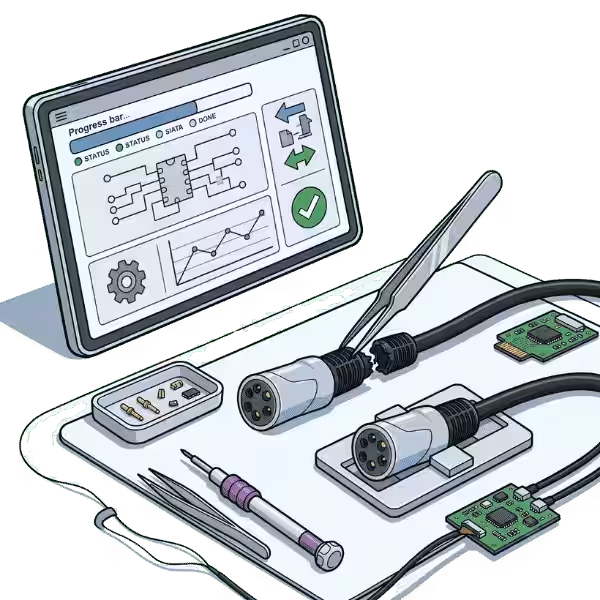
How We Fix Your Flex Connector
Diagnosis
Inspect the flex cable for damage.
Cleaning
Carefully detach the flex and clean contacts.
Replacement
Re-solder, reattach, or replace damaged flex connector.
Testing
Reassemble device and verify all functions work properly.
We are honored to provide services, buy, and sell various brands.















Quick Questions!
What is a flex connector (FPC connector)?
A Flex Connector, often called an FPC (Flexible Printed Circuit) connector, is a tiny component soldered onto a device’s main logic board (motherboard). It serves as the physical socket where a flexible ribbon cable—which connects components like the screen, charging port, or camera—plugs in, ensuring electrical contact.
What causes flex connectors to break or get damaged?
Common causes include improper installation or removal of the flex cable (using too much force, prying unevenly, or misaligning), physical impact (dropping the device), liquid damage (which can cause corrosion), and bent or broken pins due to user error during a self-fix attempt.
What are the signs that a flex connector is damaged?
Symptoms depend on the connected component, but can include:
A blank or flickering screen after a screen replacement.
Charging issues or intermittent connection after a charging port fix.
Non-functional components like the camera, home button, or volume buttons.
Visible damage like bent, missing, or corroded pins on the connector.
Can a damaged flex connector be fixed, or does it always need replacement?
In some minor cases, a skilled technician might be able to gently straighten a few bent pins. However, if pins are broken, corroded, or if the plastic housing is damaged, the connector will almost certainly need to be replaced entirely using micro-soldering techniques.
Is flex connector fix difficult or risky?
Yes, it is a highly difficult and high-risk fix. Flex connectors are extremely small and are surrounded by other delicate components on the logic board. The fix requires specialized tools, high-magnification microscopes, and advanced micro-soldering skills. An inexperienced attempt can cause irreversible damage to the logic board.
What devices can Cellshoppe.ca perform flex connector fix on?
Cellshoppe.ca generally offers flex connector fix on a wide range of devices, including iPhones, iPads, Samsung Galaxy phones, and other tablets or smartphones. If the issue requires a micro-soldering solution, it often falls under their logic board services.
How long does a flex connector replacement typically take?
The time can vary depending on the device model and the current workload. As it’s a micro-soldering service, it requires meticulous work and testing. It typically takes longer than a standard component swap. It’s best to contact Cellshoppe.ca directly for an accurate time estimate.
Is this type of fix covered under a standard warranty?
Generally, no. Flex connector damage is usually categorized as physical or liquid damage, which voids standard manufacturer and retailer warranties. Cellshoppe.ca’s own fix will typically include a warranty on the work performed.
Why is a damaged flex connector sometimes misdiagnosed as needing a new screen or charging port?
A faulty flex connector causes the component it’s meant to connect to (like the screen or charging port) to stop working. Since the component is non-functional, it’s often the first part replaced. If the new part doesn’t fix the issue, the damage is likely further up the chain—at the connector on the logic board.
How can I prevent damaging a flex connector in the future?
If you perform DIY fixes, always use plastic tools (spudgers), ensure the device is powered off and the battery disconnected before working on internal components, and always use gentle, even pressure when connecting or disconnecting cables. Never force a cable into a connector.
Our Google Reviews
shagy zeeTrustindex verifies that the original source of the review is Google. Good deal on trade in of iPhone for s22 great customer serviceVickki (Vickki)Trustindex verifies that the original source of the review is Google. I had a great experience at this cell shop. The staff were friendly, patient, and very knowledgeable. They explained everything clearly and made the process quick and easy. I’ll definitely be coming back.Kmers BarriosTrustindex verifies that the original source of the review is Google. Excellent professional repairs at right cost.David HodgesTrustindex verifies that the original source of the review is Google. Excellent service and value for money and wonderful managementНазар НазаренкоTrustindex verifies that the original source of the review is Google. My phone screen broke, and I took it to CellShoppe for a screen replacement. They did amazing job! Fast Service and great price. I got my phone within an hour. They have huge screen in stock.Daniel DowlingTrustindex verifies that the original source of the review is Google. Ismat was very helpful, fixed my son’s PS5 quickly and professionally. Thank you so much for the great serviceRezaul KabirTrustindex verifies that the original source of the review is Google. Today I got a replacement of Samsung S9 Backpart and S24 Ultra camera lenses. I like their service a lot. I highly recommend their service for phone repair, screen repair and backpack replacement. Specially, the service is very quick and fast.ayah ayahTrustindex verifies that the original source of the review is Google. Amazing shop fixed my phone and never had issues on it, policies are amazing and would 100% come back if i had any issues.
A flex connector is an integral part of many modern gadgets, like computers, phones, and tablets. These connections link the screens, touch controls, and power systems inside the device. Basically, they make it possible for data and power to be sent freely between parts of the device. This lets the touchscreen work and charges the device.
Because flex connectors are so crucial to keeping gadgets working, any damage to them can cause big problems. If there are issues with the flex connection, devices might not work correctly. This can cause problems like screen flickering, unresponsive touch screens, or even power loss. To fix this, call a professional. They can fix the flex connection. This is important if you also need services for the HDMI port, USB port, or phone camera.
Common Signs of Flex Connector Issues
Screen flickering or no display: A broken flex connection can cause your screen to flash or go black. This makes it difficult to use your device correctly.
Unresponsive Touchscreen or Malfunctioning Buttons: If your device’s touchscreen is slow or unresponsive, check the flex connection. This connection links the screen to the main board and might be the issue.
Device overheating: When a flex link doesn’t work right, bad connections can cause it to overheat, which can make the system unstable.
Loss of touch functionality or display distortion: The flex connection may be broken if the screen starts to act up by showing strange colors, lines, or distortions.
Failure to charge or connect to power sources: If your device isn’t charging properly or won’t connect to a power source, the flex connection could be to blame.
Random disconnections or failures can happen. A broken flex link may weaken the connection. This can lead to frequent disconnections, affecting Wi-Fi and important hardware contacts.
If any of these things happen with your Samsung fixes or Pixel phone fixes, the flex connection probably needs to be fixed by a professional. For the game system to work correctly again after fix, data removal, or data transfer, the flex connector may need to be replaced or fixed, just like with these other devices.
Types of Flex Connectors We Fix
Flex connectors come in various types, depending on the device and the components they connect. Below is a breakdown of the different types of flex connectors we commonly fix:
Type of Flex Connector | Description |
Display Flex Connector | Connect the screen or display to the motherboard. Issues with this connector can lead to screen malfunctions, flickering, or a blank screen. |
Battery Flex Connector | Links the battery to the motherboard, responsible for charging and power supply. Damage to this connector can result in charging issues or battery drain problems. |
Camera Flex Connector | Connects the front and rear cameras to the motherboard. Problems with this connector can cause camera malfunctions, blurry photos, or no image display. |
Touchscreen Flex Connector | Responsible for the connection between the touchscreen and the motherboard. Damage can lead to unresponsive touch, delayed inputs, or complete touchscreen failure. |
Audio Flex Connector | Connects the speaker or audio components to the motherboard. Issues here can cause no sound, distorted audio, or poor-quality sound. |
Home Button Flex Connector | Connects the home button to the device’s motherboard. Malfunctions may result in the home button not responding or an intermittent function. |
Power Button Flex Connector | Connect the power button to the motherboard. If damaged, it can cause issues with turning the device on or off, or failure to register button presses. |
Charging Port Flex Connector | Links the charging port to the motherboard, responsible for the device’s ability to charge and transfer data. Issues with this connector can result in charging failure. |
Our Flex Connector Fix Services
Our flex connector fix service at CellShoppe near in Jasper place is meant to get your devices back to working at their best. The first step in fixing your flex connector is a thorough check and tests to find out exactly what’s wrong. Our experts carefully look for any harm, wear and tear, or loose links that might be the cause of the issue.
If we find that the connection is broken, we replace it with a high-quality, long-lasting part to make sure that it works well for a long time. After putting the new flex link in place, we carefully put the gadget back together and test it thoroughly. This includes making sure that the screen, buttons, and power features all work as they should.
We can fix flex connectors on many products, such as computers, smartphones, and tablets. We handle every fix with care and precision. This includes fixing a broken game system, removing a virus, or transferring data between devices. If your device isn’t working right, it could be more than just a broken screen or power port. There could be a problem with the flex link that needs to be fixed by a professional.
How Our Flex Connector Fixing Service Works
Diagnostic Assessment
When you bring your device to CellShoppe sevice center near Jasper Place, we start by doing a full diagnostic check to see how the flex port is doing and figure out what the problem is. We’ll check the whole thing to make sure we find all the important problems.
Quote and Authorization
As soon as we know what the problem is, we give you an honest and complete price. We tell you up front how much the fix will cost and how long it will take, so you know what to expect. We’ll start the fix as soon as you agree to the price.
Flex Connector Fix
First, our experts carefully get to the damaged flex connector. We either fix the connection or replace it with a high-quality new part, depending on how bad the damage is. Extreme care is taken in every step to make sure the fix works and lasts.
Testing and Quality Control
We carefully test the device after the fix is done to make sure the flex connector works properly. We check the screen, battery, camera, and speakers, among other parts, to make sure everything is working as it should.
Final Delivery
After we’ve fixed your device and made sure it works again, we’ll let you know that it’s ready to be picked up. Before giving it back to you, we make sure that everything is back to normal.
Why Choose Us for Flex Connector Fix
When it comes to fast and high-quality flex connection fix, CellShoppe is the name you can trust. Our skilled techs are experts at fixing flex connectors and can handle even the most difficult problems with ease. We know how important it is to get your device back up and running as soon as possible, which is why we offer quick, reliable fixes with little downtime.
You’ll always know what to expect from us because our prices are fair and there are no secret fees. We use only top-quality parts to replace your flex connection. This helps your device last longer and work better. We also stand behind our work with a promise that you will be happy with it. After every fix, we test it carefully to make sure it works properly.
We fix flex connectors, but we also handle other essential tasks. This includes fixing phone screens, charging ports, and addressing water damage. If the camera on your device isn’t working right, our phone camera fixing service can fix it right away. CellShoppe will meet all of your service needs with the same level of skill and efficiency.
Why Choose Cellshoppe?
Experience the difference with our premium mobile device solutions and exceptional customer service
We value your time. Our new Doorstep Fix brings expert fixes directly to you, so you can get back to your day.
Get unbeatable deals on premium smartphones and accessories with our price-match guarantee.
Our certified technicians provide professional fixes, unlocking, and technical support for all devices.
Enjoy same-day pickup or quick shipping options to get your device when you need it most.