


iPhone 16 Pro Max vs iPhone 15
October 5, 2025


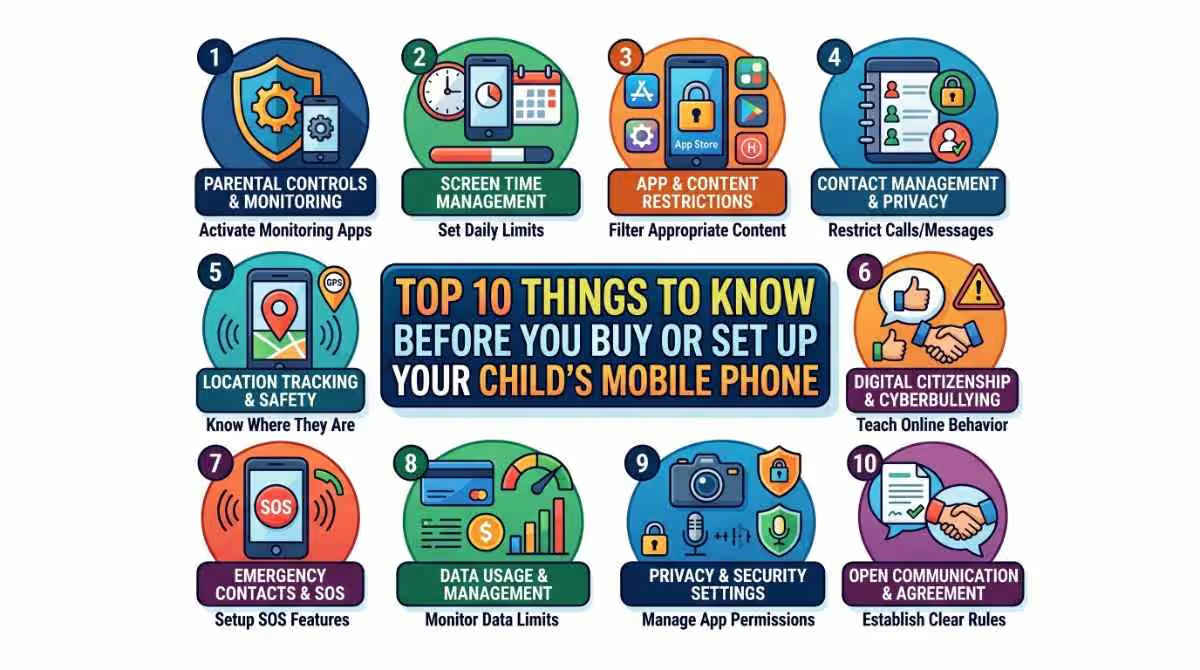
Giving your childs mobile phone is a significant milestone. It opens up new ways to learn, improves conversation, and makes people feel safe. Today, more kids use computers at younger ages. If you want to get your child their first cell phone or an upgrade, make smart choices. You can rest easy knowing that they are safe. Before they use their phone, you need to know how to set it up correctly.
But it also means that both adults and kids have to do things and face difficulties. Keep these important things in mind before they buy or set up their phone to make sure they have a safe and good experience. This guide will help you choose the right gadget and teach kids safe habits.
Before you decide to buy or give your child a cell phone, you must know which mobile phone is best for him. Not all cell phones are made equal, and what works for an adult might not suit a child. We can group children by the right phone for them: younger kids and bigger kids/teens. Follow the right guidelines before getting a childs mobile phone.
Younger Children: For kids in grade school, a basic phone without internet access may be best. Devices such as flip phones or phones made for children allow you to make calls and send texts. They do this without the interruptions of apps or social media.
Older Children/Teens: A smartphone can be a good choice for middle or high school kids. It helps them with learning and directions.
For younger children, a more basic phone might be a better choice. As your child grows, they might need a better phone. Look for one with a good camera, a bigger screen, and extra features. Smartphones are more useful for bigger kids. They offer access to many apps and tools. It’s smart to pick a sturdy phone. Also, choose one with a protected case and a guarantee. This helps you avoid expensive fixes. Know the Important when you buy a phone for your child’s:
One of the first factors when getting a cell phone for your child is their age. There’s no set age for a child’s first phone, but it’s important to check if they are grown enough for the duty. The American Academy of Pediatrics suggests waiting until a child is at least 12 or 13 to get a smartphone. Many parents give phones to younger kids, especially basic ones, for situations.
For younger kids, think about a phone with basic functions. A simple mobile device or a “starter” phone works well. These choices let kids text, call, and use position tracking.
Before giving over a smartphone, it’s important to talk to your child about the possible risks. These include exposure to inappropriate material, harassment, and internet predators. Teach your child about internet safety and social media. Also, discuss privacy choices. This can help protect them from risks. If have a IOS device you need check battery health that’s good for your childs mobile phone.
Talk about abuse and how to handle it. Encourage your child to report instances and promise them they can come to you for support. Also, teach them about their internet trail. Remind them that online posts can last forever. Discuss the value of not sharing passwords, addresses, phone numbers, or school information online. Equip them with tools to spot phishing scams or other fake activities.
One of the biggest worries for parents is how much time their child spends on their phones. Set limits early to control your child’s screen time on your childs mobile phone. This helps them use their phone in a healthy, balanced way. Many smartphones now have tools to help you control screen time. You can limit usage, block apps, or set curfews for your phone. These controls simplify the process of checking and managing your child’s phone behavior.
Both iOS and Android phones allow parents to control screen time. Set daily app limits. This helps avoid excessive use and supports offline activities. Turn on settings to block explicit material, unsuitable websites, and age-inappropriate apps. Clean phone screen for protect from germs. For instance, Apple’s Screen Time and Google’s Family Link let you block web material and limit app downloads.
Many parental control apps let you track and manage your child’s phone use from a distance. These apps can help you check texts, calls, app usage, and even social media behavior. Popular security apps include Qustodio, Bark, and Norton Family.
These tools help keep your child safe online and promote cautious phone use. Review the apps already installed on the phone and check for new downloads. Ensure your child only uses apps that are age-appropriate and fit with your family’s morals.
Many cell carriers offer family deals that are more affordable than individual rates. When getting a cell phone for your child, think about a family plan. It can include lines for different family members. These plans let you handle your child’s phone plan. You can add data choices, control text messages, and set call limits. Setting up a family plan helps you keep track of the phone’s usage and spending.
It’s crucial to protect your child’s personal information and ensure their internet safety. Create strong passwords. Turn on fingerprint verification. Also, allow two-factor security on your kids cell phone. Check the private settings on your phone, whether it’s iOS or Android. Limit app access, such as position sharing. Take backup phone data daily.
This helps keep your child’s information safe. Show your child how to lock their phone. Use a password or unique features like fingerprints or Face ID. Stress the importance of not sharing this information with anyone but family members.
Discuss phone manners with your child. Share your expectations before they begin using their phone. Explain the rules about talking, calling, and using apps. Friends and outsiders can interact online in many ways. They can chat on social media, forums, or game sites. It’s important to be nice but also careful. If someone sees inappropriate material, they should report it. Most sites have a button for this. They should also block the person if they feel awkward.
When a stranger approaches, it’s best to be careful. Don’t share personal information. If the chat feels wrong, it’s okay to stop replying or to block them. Always tell a trusted friend or adult about the situation. Define when and where your child can use their phone. For example, keep phones off the dinner table and quiet them during school hours. Please encourage them to focus on face-to-face exchanges to build social skills.
A smartphone isn’t just for games and texts. It can also teach duty and accountability. Please help your child use their phone for learning. They can discover educational tools, do research, or talk to teachers.
Teaching your child about digital duty helps them make better online choices. Lead by example by reducing your computer time. Create phone-free zones in the house, like beds or the dinner table. Stay active by discussing their adventures with their phone.
Check their apps, settings, and habits on a regular basis. This helps ensure they follow your rules. You may also care for phone damage caused by their hands. You can easily fix gadgets from CellsShoppe; we offer many repair services. Available services are screen fix, battery refills, phone trade-in service, and iPhone repair choice.
Set rules for your child’s social media use if they are old enough to have accounts. Make their pages secret. Teach them to connect only with real friends. Finally, urge them to avoid oversharing personal information.
Once your child has a phone, your duty doesn’t end. It’s important to conduct regular reviews of their phone usage and check how they’re handling it. Have regular check-ins. This helps make sure they follow your rules. You can also talk about what they do on their phone. Stay active in their internet world and be aware of any changes in their behavior.
Deciding to give your child a cell phone is a big step. With careful planning and open talks, it can be a great event for the whole family. Set clear rules and stay involved. Engage in frequent discussions with your child about phone use and internet safety.
This helps them build smart habits and a good relationship with technology. Your part is important in helping your child manage their digital world. Make sure their phone works as a tool for learning, connecting, and growing. Buy a new phone from the CellShoppe shop.
Quick Questions!
For younger children, a basic phone without internet access, such as a flip phone or a child-specific mobile phone, is often a good choice. These phones allow for calls and texts without the distractions of apps or social media.
There is no set age, but the American Academy of Pediatrics recommends waiting until your child is at least 12 or 13 years old before giving them a smartphone. However, some parents may opt for a basic phone for younger kids to ensure they have communication access.
Both iOS and Android phones offer tools to control screen time. For iOS, use Screen Time, and for Android, use Family Link. These apps allow you to set daily limits for app usage, block content, and even set phone curfews.
There are several parental control apps available, such as Qustodio, Bark, and Norton Family. These apps let you monitor app usage, track calls and messages, and ensure your child is using their phone safely and responsibly.
Set up strong passwords, enable two-factor authentication, and use biometric features like Face ID or fingerprint sensors. Also, make sure to limit app access to sensitive data, and teach your child not to share personal information online.
October 5, 2025
October 5, 2025
September 19, 2025
September 19, 2025
September 18, 2025
September 18, 2025
Address: 15803 87 Ave NW, Edmonton, AB T5R 4G7, Canada
Phone: +1 587-444-5888
Support


To Grab The Offer, Fill The Form and Submit Now!