


How a Professional Privacy Audit and Malware
July 25, 2026


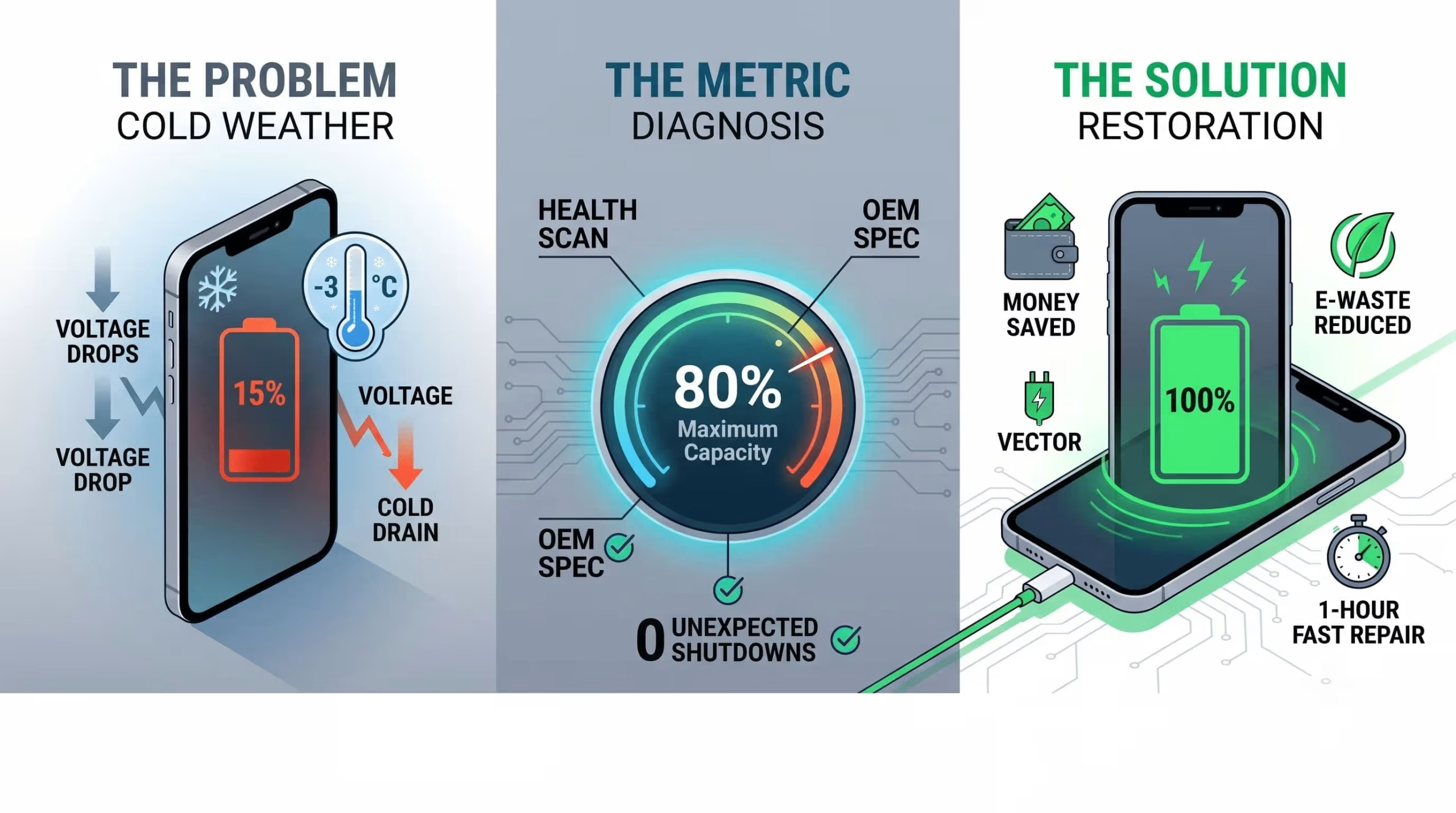
Determining when to replace smartphone battery components requires looking beyond daily charging frustrations and understanding the underlying lithium-ion chemistry of your device. As your phone ages, natural electrochemical degradation permanently reduces its ability to hold and distribute energy, impacting both screen time and processor speed.
Industry hardware engineers have established an 80% maximum capacity threshold as the critical baseline. Once your internal cell drops below this metric, it triggers voltage instability, unexpected power-offs, and aggressive dynamic performance management where your operating system deliberately slows down the CPU. By recognizing these early warning signs of battery failure, consumers can quickly restore peak operational performance and safely extend the lifespan of their device without funding a premature flagship upgrade.
Understanding how lithium-ion cells age is essential for timing hardware servicing before unexpected device failures occur. Every smartphone battery operates on a finite number of charge cycles typically between 500 to 1,000 full charges before chemical degradation severely reduces energy density and increases internal resistance. In Edmonton, this electrochemical wear is frequently accelerated by extreme seasonal temperature fluctuations, as sub-zero winter weather triggers rapid voltage drops and sudden thermal shutdowns.
When a handset struggles to hold a charge or exhibits severe processor throttling, delaying maintenance risks permanent component stress. Seeking timely, professional cell phone battery repair Edmonton services allows certified technicians to run advanced diagnostic checks, evaluate real-time capacity health, and replace degraded cells with high-precision hardware. Proactive local repair restores optimal voltage distribution, protecting your smartphone’s logic board and guaranteeing reliable daily performance through all Canadian seasons.
Battery capacity fade is an unavoidable electrochemical reality, not a software glitch. Each charge cycle triggers internal reactions that naturally thicken the solid electrolyte interphase (SEI) layer. This microscopic buildup permanently consumes your active lithium inventory, which raises the internal electrical impedance of the battery over time.
As impedance grows, the cell struggles to distribute energy efficiently, causing rapid voltage drops and sudden power-offs. While this chemical degradation is natural, external factors like extreme thermal stress or liquid ingress drastically accelerate the cell’s death. If you suspect moisture is speeding up this internal corrosion, executing our “What to Do (and What to Avoid) the Second Your Phone Gets Water Damage” is critical to preventing logic board short circuits before the battery fails entirely.
For a deeper look into the technical diagnostics behind capacity fade, ( Degradation Patterns of Lithium-Ion Batteries {Youtube Video input}) breaks down how impedance spectroscopy and machine learning pinpoint the exact electrochemical health of aging cells.
Inside every smartphone, electrical power relies on a liquid chemical mixture called an electrolyte. As months pass, natural chemical aging causes this liquid to gradually break down and lose its ability to move energy smoothly between internal components. This permanent decay reduces your device’s overall holding capacity.
As the battery degrades over time, several noticeable internal shifts occur:
Increased Resistance: Chemical buildup creates internal friction, making it harder for electricity to flow out of the cell.
Faster Power Drains: The battery reaches full charge faster, but runs out of power much sooner than when it was brand new.
Excess Heat Generation: The battery produces noticeable warmth during basic tasks like text messaging or browsing, as the internal components work harder to supply electricity.
Plugging in your phone for a quick charge does not instantly ruin the battery. Modern devices age based on total charge cycles rather than how many times you attach the charging cable.
Understanding how charging habits affect battery life helps you protect your handset:
Full Charge Cycle: One cycle equals using a total of 100% of your battery’s capacity. If you use 70% of your battery today and charge it overnight, then use 30% tomorrow, that equals one complete charge cycle. Most cells are rated for 500 to 800 cycles before major capacity loss happens.
Daily Topping Off: Plugging in your phone when it hits 40% and taking it off at 80% is a partial charge. Short top-ups produce far less internal heat and chemical stress than letting the battery drain completely to zero.
The 20% to 80% Rule: Keeping your phone charged between 20% and 80% avoids the high-stress zones at the extreme ends of the battery range, preserving the health of the cell for months longer.
Edmonton’s severe winter climate poses a major physical challenge for smartphone hardware. When temperatures drop below freezing, the liquid inside your battery thickens, causing internal chemical reactions to slow to a crawl.
Here is how local winter weather affects your device performance:
Sudden Voltage Drop: Because the chemical reaction slows down in the cold, the battery struggles to output the steady voltage needed to power your phone’s processor.
Unexpected Shutdowns: Your phone may suddenly turn off even if the screen shows 30% or 40% battery remaining. The internal operating system triggers a protective shutdown to keep the logic board safe from low-voltage damage.
Temporary vs. Permanent Capacity Loss: While cold-weather battery drain is mostly temporary, forcing a freezing phone to run heavy apps stresses the internal components and speeds up permanent cell failure over time. Keeping your device in an inside coat pocket helps maintain a safe operating temperature during Edmonton winters.
Recognizing the early hardware symptoms of a failing lithium-ion cell allows you to intervene before erratic power delivery causes deeper logic board issues. While sudden percentage plummets are obvious red flags, secondary signs like noticeable thermal spikes during basic tasks or system lag often indicate severe voltage instability.
If your device shows these warning signs alongside physical glass damage, evaluating the “Should You Repair Your Phone or Upgrade to a New Device?” will help you calculate overall repair value. Spotting these critical battery failure symptoms early, especially physical cell swelling that pushes against the display allows certified technicians to safely swap the battery and fully restore peak processor performance.
As lithium-ion batteries chemically age and drop below the industry standard of 80% maximum capacity, they lose their ability to push high, stable voltage to the main logic board. When you open a heavy application or use the camera, the aging battery struggles to meet the sudden power demand. To prevent the voltage drop from causing an unexpected device shutdown, your operating system triggers a protective feature called thermal throttling.
This dynamic performance management intentionally slows down your processor, making your device feel sluggish, dimming the screen, and lowering the speaker volume. If your phone is still randomly powering off completely even when the status bar shows 20% or 30% power remaining, you have hit the critical threshold of when to replace smartphone battery units. Swapping the degraded cell is the only way to remove this software throttling and restore your phone’s peak performance capability.
Sometimes, a dying lithium-ion cell will fail physically rather than just chemically. When the internal liquid electrolyte breaks down under extreme heat or charging stress, it releases trapped gases, a chemical process known as off-gassing. Because smartphone batteries are tightly wrapped and sealed, this gas creates immense internal pressure, causing the cell pouch to swell up like a thick balloon.
You will usually notice this hazard first as screen separation. The swelling battery physically pushes against the internal components, bending the metal chassis outward and lifting the glass display away from the frame. A swollen battery is a severe fire hazard and chemical safety risk that can easily shatter your screen from the inside out. If your phone casing begins to bulge, immediately power it down and take it to a certified repair center.
Knowing exactly how much chemical life is left in your cell is the easiest way to monitor your hardware health. Both major operating systems now give you direct access to these diagnostic metrics, though they are accessed differently depending on your brand.
On Apple iOS: Navigating to Settings > Battery > Battery Health reveals your exact “Maximum Capacity” percentage. Apple hardware engineers state that a standard iPhone battery is designed to remain above the 80% health threshold for its first 500 complete charge cycles.
On Android Devices: Finding this metric used to be difficult, but modern Android 15 and 16 systems (including newer Google Pixel and Samsung devices) now feature a native “Battery Health” readout directly in the standard battery settings menu. For older Android models, you can often reveal a hidden diagnostic menu by dialing *#*#4636#*#* in the phone app, or by installing third-party analytical tools like AccuBattery to accurately map out your true capacity drop over a few charging sessions.
For a visual walkthrough of locating these diagnostic menus on devices that hide this data, watching How to Check Actual Battery Health Capacity on Android shows exactly which settings to tap to reveal your true degradation percentage.
Evaluating whether to service an aging phone or invest in a new flagship comes down to calculating total cost of ownership. Swapping a degraded lithium-ion battery requires a minimal capital outlay typically a fraction of a new device’s price tag while instantly eliminating software throttling and restoring peak processing speed. From a financial perspective, replacing a fully functional smartphone simply due to a temporary power deficiency accelerates unnecessary tech depreciation.
If you decide to extend your current handset’s lifecycle or purchase a pre-owned alternative, pairing battery maintenance with a “How a Professional Privacy Audit and Malware Scan Can Protect Your Used Phone” maximizes your long-term investment. This dual approach guarantees both hardware stability and software security, ensuring your device remains fast, safe, and cost-effective.
An OEM (Original Equipment Manufacturer) battery is the exact same high-quality power cell originally installed in your device at the factory. While aftermarket batteries might seem slightly cheaper upfront, calculating the true value ratio proves that genuine parts are a much smarter, long-term investment. A premium original battery safely restores your daily screen time, prevents internal overheating, and ensures the cell perfectly fits your device’s housing. When you compare the minor cost of a genuine battery swap against the massive expense of buying a brand-new flagship phone, the math heavily favors keeping your current device.
Many consumers assume their phone is completely outdated when it simply needs a fresh power source. Knowing when to replace smartphone battery components instead of buying a whole new device can save you hundreds of dollars. A quick cell swap is the superior choice when:
The Hardware is Flawless: Your display glass is crack-free, the camera takes great photos, and the charging port connects easily.
Software is Still Supported: Your phone model is still receiving active security patches and daily operating system updates from the manufacturer.
Storage is Sufficient: You have plenty of space left for your apps and photos, meaning the only real issue is that your phone dies before the evening.
Choosing to fix your phone does more than just save you money; it directly protects our environment. Manufacturing a single new smartphone generates roughly 70 kilograms of carbon emissions and requires massive amounts of natural resources. In contrast, performing a local battery repair generates only about 5 kilograms of emissions. By bringing your aging handset to a local Edmonton electronics shop instead of throwing it away, you keep hazardous lithium and heavy metals out of local landfills. Simple, routine maintenance proves that the most eco-friendly and affordable smartphone is usually the one you already own.
When your device succumbs to extreme thermal stress or accelerated charge cycle exhaustion, securing aprofessional smartphone battery replacement in Edmonton is critical to preserving your hardware investment. Certified local technicians specifically serving areas like West Edmonton utilize advanced diagnostic algorithms to pinpoint exact voltage distribution failures and electrochemical capacity drops before opening the chassis.
Rather than risking catastrophic logic board damage through unvetted DIY attempts, professional repair centers execute meticulous extraction protocols, replacing degraded lithium-ion cells with premium, original-grade hardware. This expert intervention instantly resolves dynamic processor throttling, unexpected shutdowns, and erratic power drains. By prioritizing authorized local servicing, consumers safely restore maximum energy density and peak operational stability, ensuring their smartphone withstands even the harshest Canadian winters.
Before ever opening your device, certified repair technicians use advanced software to test your battery’s internal health. This professional diagnostic scan checks the exact charge capacity, voltage output, and cycle count to confirm if a physical swap is truly necessary, or if a rogue background app is simply draining your power. When hardware replacement is required, using OEM-quality (Original Equipment Manufacturer) parts is non-negotiable. These authentic, factory-grade batteries ensure proper energy density and thermal safety. This means your phone will efficiently hold a charge without overheating or suddenly shutting down during daily use.
When you are deciding exactly when to replace smartphone battery components, waiting weeks for a mail-in factory repair is rarely practical. Located conveniently in West Edmonton near Jasper Place, CellShoppe offers professional, same-day battery swaps to safely get your device back on track.
Our expert technicians understand how disruptive a dying phone is to your routine. That is why our local repair process provides:
Free Diagnostics: We thoroughly test your device first to pinpoint the exact power issue without upfront costs.
Premium Hardware: We use top-quality, verified batteries that perfectly fit your specific Apple, Samsung, or Google Pixel model.
Rapid Turnaround: Most battery replacements are carefully completed on-site in under an hour, so you never have to leave your phone overnight.
Once your fresh power cell is successfully installed, adjusting your daily charging habits will keep your phone running at peak speed for much longer.
To protect your new hardware investment and prevent rapid chemical aging, follow these simple everyday care tips:
Adopt the 20-80 Rule: Try to unplug your phone when it reaches 80% and plug it back in before it drops below 20%. Forcing the battery to stay at 100% overnight causes unnecessary chemical stress.
Avoid Extreme Temperatures: Never leave your device sitting in direct sunlight or a hot car dashboard. High heat permanently destroys internal battery capacity.
Use Authentic Cables: Cheap, unbranded charging bricks deliver unstable voltage that can permanently damage your new battery’s internal power management chip.
Recognizing when to replace a smartphone battery is the key to maintaining peak device performance and avoiding unnecessary upgrade costs. Whether you are dealing with Edmonton’s sub-zero winter battery drain, software throttling below the 80% capacity threshold, or physical cell swelling, a targeted battery swap solves the root problem. Replacing a degraded lithium-ion cell restores your handset’s original speed, saves money, and reduces hazardous e-waste proving that local repair is almost always the smartest economic and environmental choice for your device.
Quick Questions!
You should replace your smartphone battery when its maximum capacity drops to 80% or below. Once a lithium-ion cell degrades past this chemical threshold, its internal resistance increases sharply, leading to erratic voltage delivery. Below 80% capacity, you will experience significantly reduced screen-on time, unexpected mid-day power drops, and automatic software performance throttling designed to prevent sudden device shutdowns.
The primary indicators of a failing smartphone battery include:
Rapid Discharge: The battery percentage drops visibly fast even during basic tasks like texting or checking emails.
Sudden Shutdowns: The phone unexpectedly powers off when the battery indicator still displays 20% to 30% remaining power.
System Sluggishness: Applications take longer to open and user interface animations stutter due to power management throttling.
Unusual Heat: The back of the device becomes excessively hot during routine light usage or standard charging.
Physical Expansion: The battery swells, causing the screen glass to lift or the back panel to separate from the frame.
In extreme sub-zero temperatures such as an Edmonton winter dropping to -20°C or lower the liquid electrolyte solution inside a lithium-ion battery thickens dramatically. This physical change severely slows the electrochemical reaction, spikes internal resistance, and causes severe voltage sag. When your phone demands peak power in freezing weather, the Battery Management System (BMS) misinterprets this sudden voltage drop as a depleted battery and triggers an immediate safety shutdown. While this cold-induced power loss is temporary, repeatedly attempting to charge a frozen battery can cause permanent lithium metal plating, leading to irreversible capacity loss.
If your smartphone’s processor, camera, and display still meet your daily requirements, replacing the battery is far more economical. A battery replacement costs a small fraction of a new flagship phone while instantly restoring 100% of your device’s original daily stamina and processor speed. Upgrading to a new phone is generally only necessary if the device no longer receives critical security updates, the motherboard has sustained unrepairable hardware damage, or the total cost of required repairs exceeds 50% of the device’s secondary-market value.
A charge cycle is completed whenever you discharge an amount equal to 100% of your battery’s total design capacity whether that occurs in a single continuous drain or spread across multiple partial charges (e.g., using 50% today, recharging overnight, and using 50% tomorrow). Standard smartphone lithium-ion batteries are engineered to maintain roughly 80% of their original health for 500 to 800 full charge cycles, which translates to approximately 1.5 to 2 years of standard daily usage.
Sudden shutdowns occur because of voltage sag in a chemically aged battery cell. As batteries age, their internal resistance rises. When you launch a demanding application, take a flash photo, or stream high-definition video, the processor requests a sudden burst of current. Because the aged cell cannot maintain a stable voltage supply under heavy load, the internal power drops below the threshold required to keep the microelectronics running, forcing the Power Management Integrated Circuit (PMIC) to execute an emergency shutdown to protect internal components.
Yes, a swollen battery is a serious safety hazard caused by gas accumulation from severe internal chemical breakdown and thermal degradation. If your screen or back panel is separating from the metal chassis:
Power down the handset immediately.
Unplug the device and do not connect it to any charger.
Do not press down on the screen or attempt to squeeze the gas out.
Place the phone in a cool, fire-safe area away from flammable materials and bring it to a certified repair technician immediately for safe isolation and hazardous waste disposal.
Thermal throttling and power management throttling are automated system defense mechanisms. When operating systems detect that an aging, high-resistance battery can no longer safely supply the voltage required for peak processor workloads, the software dynamically caps the clock speed of the CPU and GPU. This intentional slowdown prevents the phone from suffering brownout shutdowns, but it causes noticeable system lag, slower app launch times, and reduced frame rates during daily operation.
On iPhone: Go to Settings > Battery > Battery Health & Charging to view the “Maximum Capacity” percentage. Checking this metric is a critical step when inspecting pre-owned hardware, ensuring a secondary-market device meets the high operational standards detailed in a Refurbished iPhone Excellent Condition Guide (where a capacity rating of 80% or higher is mandatory).
On Android: Open your device’s built-in diagnostic app (such as Samsung Members > Diagnostics > Battery Status) or install specialized diagnostic tools like AccuBattery to measure real-time discharge rates, estimated mAh capacity, and wear cycles over a few charge periods.
Modern smartphones use smart onboard charge controllers that stop power intake once the cell hits 100%, meaning overnight charging will not cause explosive overcharging. However, holding a lithium-ion battery at a fully saturated 100% charge state for hours on end especially in warm ambient temperatures subjects the chemical components to high electrical stress. Utilizing features like “Optimized Battery Charging” (which holds the battery at 80% overnight and finishes charging right before you wake up) mitigates this wear.
Yes, maintaining your battery charge level between 20% and 80% significantly extends its operational lifespan. Lithium-ion batteries experience the most mechanical and chemical stress at extreme states of charge below 20% (deep discharge) and above 80% (high voltage saturation). By keeping the charge within this middle zone, you reduce electrode degradation and can effectively double the total number of usable charge cycles before hitting the 80% maximum capacity threshold.
An OEM (Original Equipment Manufacturer) or premium OEM-grade battery is built with high-density chemical cells, accurate power management microchips, and integrated thermal safety fuses. They match original factory specifications for capacity, safety, and OS communication. Conversely, cheap aftermarket batteries often feature recycled or low-grade materials, falsified mAh ratings, lack critical thermal protection, and frequently cause erratic percentage readouts, rapid capacity degradation, or premature swelling.
Yes. Replacing an aged cell with a fresh OEM-grade battery restores stable power delivery across all operating conditions. Once the operating system verifies that the power supply can handle high peak loads, it automatically disables dynamic performance throttling. This restores full CPU and GPU clock speeds, eliminates UI lag, and brings overall screen-on time back to its original factory performance.
A professional battery replacement at a qualified local repair shop typically takes 30 to 45 minutes. During this procedure, certified micro-technicians warm the device frame to safely soften water-resistant seals, extract the degraded battery without puncturing its protective casing, apply fresh custom-cut adhesive strips, and verify the power management IC’s diagnostic readouts before re-sealing the phone.
Manufacturing a single new smartphone generates roughly 60 to 80 kilograms of carbon dioxide equivalent (CO2e) emissions, with over 80% of that environmental impact coming from precious metal mining, raw material processing, and silicon refining. Opting to replace a degraded battery instead of buying a new device extends the operational life of existing hardware by 2 to 3 years. This single repair action prevents toxic heavy metals from entering landfills and eliminates the massive environmental footprint associated with manufacturing a brand-new handset.

Director IT and Marketing
Based in Edmonton, Alberta, Dr. MD Samiul Islam is an Information Systems Consultant, Generative AI Specialist, and Machine Learning Engineer. Holding a Ph.D. in Computing Science from the University of Alberta, he specializes in model interpretability, responsible AI frameworks, and scalable MLOps architectures across Azure, AWS, and GCP. Dr. Islam designs production-grade AI pipelines and predictive analytics solutions using PyTorch, TensorFlow, and LangChain. His domain experience spans high-impact enterprise applications, including satellite crop mapping, hydrological flood modeling, and epidemiological data analytics.
July 25, 2026
July 24, 2026
July 23, 2026
July 22, 2026
July 9, 2026
July 9, 2026
Address: 15803 87 Ave NW, Edmonton, AB T5R 4G7, Canada
Phone: +1 587-444-5888
Support


To Grab The Offer, Fill The Form and Submit Now!